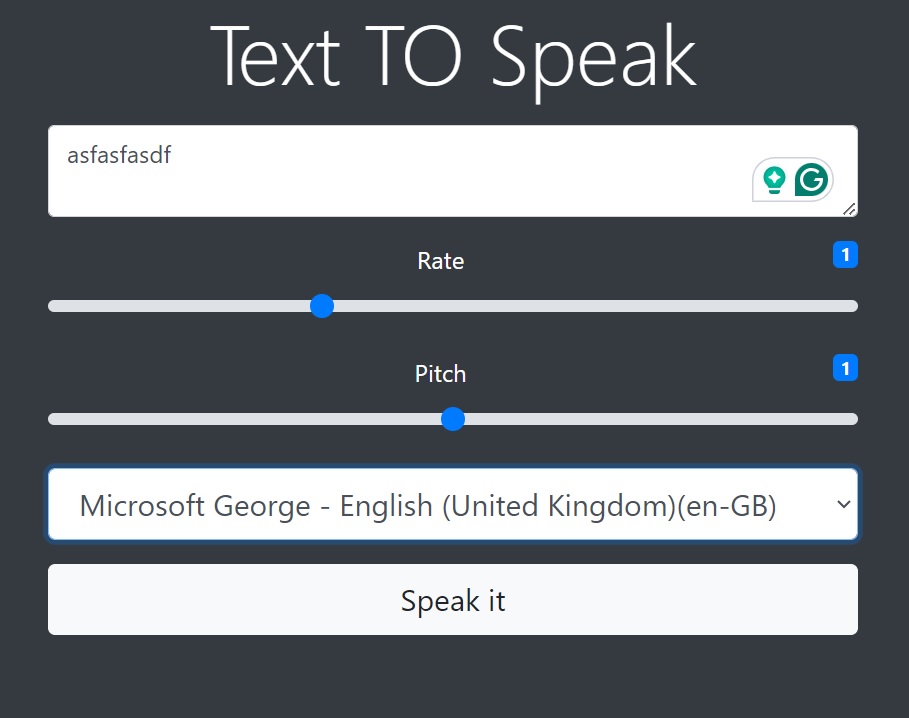
Text to Speech
Web Speech API Implementation
A web application that converts text to speech using modern browser APIs, featuring customizable voice options, speech controls, and responsive design.
Key Features
Speech Synthesis
Converts text input to natural-sounding speech using the browser's Web Speech API with multiple voice options.
Voice Customization
Allows users to customize speech rate, pitch, volume, and select from available system voices.
Playback Controls
Complete playback control with play, pause, stop, and resume functionality for enhanced user control.
Cross-Platform
Works across different browsers and devices with graceful fallbacks for unsupported features.
Development Journey
API Research & Setup
Researched Web Speech API capabilities, browser compatibility, and set up development environment for speech synthesis implementation.
Core Functionality
Implemented basic text-to-speech functionality with voice selection, speech controls, and error handling for unsupported browsers.
Customization Features
Added speech customization options including rate, pitch, volume controls, and dynamic voice loading from system available voices.
UI Polish & Testing
Designed intuitive user interface, implemented responsive design, and tested across multiple browsers and devices for compatibility.
Challenges & Solutions
Browser Compatibility
Ensuring consistent functionality across different browsers with varying Web Speech API support and voice availability.
Implemented feature detection and graceful degradation for browsers with limited API support.
Voice Selection
Managing different voice options available on various operating systems and browsers with dynamic loading.
Created dynamic voice loading system that adapts to available system voices.
User Experience
Creating intuitive controls for speech customization while maintaining simplicity and accessibility.
Designed clean interface with real-time feedback and accessible controls for all speech parameters.
class TextToSpeech {
  constructor() {
    this.synth = window.speechSynthesis;
    this.voices = [];
    this.utterance = null;
    this.isPlaying = false;

    // Load voices when available
    this.loadVoices();
    if (this.synth.onvoiceschanged !== undefined) {
      this.synth.onvoiceschanged = () => this.loadVoices();
    }
  }

  loadVoices() {
    this.voices = this.synth.getVoices();
    this.populateVoiceList();
  }

  speak(text, options = {}) {
    if (!this.synth) {
      throw new Error('Speech synthesis not supported');
    }

    // Stop any current speech
    this.stop();

    this.utterance = new SpeechSynthesisUtterance(text);

    // Apply customization options
    this.utterance.voice = options.voice || this.voices[0];
    this.utterance.rate = options.rate || 1;
    this.utterance.pitch = options.pitch || 1;
    this.utterance.volume = options.volume || 1;

    // Event handlers
    this.utterance.onstart = () => {
      this.isPlaying = true;
      this.onSpeechStart?.();
    };

    this.utterance.onend = () => {
      this.isPlaying = false;
      this.onSpeechEnd?.();
    };

    this.utterance.onerror = (event) => {
      console.error('Speech synthesis error:', event.error);
      this.onSpeechError?.(event.error);
    };

    this.synth.speak(this.utterance);
  }

  pause() {
    if (this.synth.speaking && !this.synth.paused) {
      this.synth.pause();
    }
  }

  resume() {
    if (this.synth.paused) {
      this.synth.resume();
    }
  }

  stop() {
    this.synth.cancel();
    this.isPlaying = false;
  }

  getAvailableVoices() {
    return this.voices.filter(voice => !voice.localService);
  }
}

// Usage example
export const tts = new TextToSpeech();
tts.onSpeechStart = () => console.log('Speech started');
tts.onSpeechEnd = () => console.log('Speech ended');

// Speak with custom options
tts.speak('Hello, this is a text to speech demo!', {
  rate: 1.2,
  pitch: 1.1,
  volume: 0.8
});