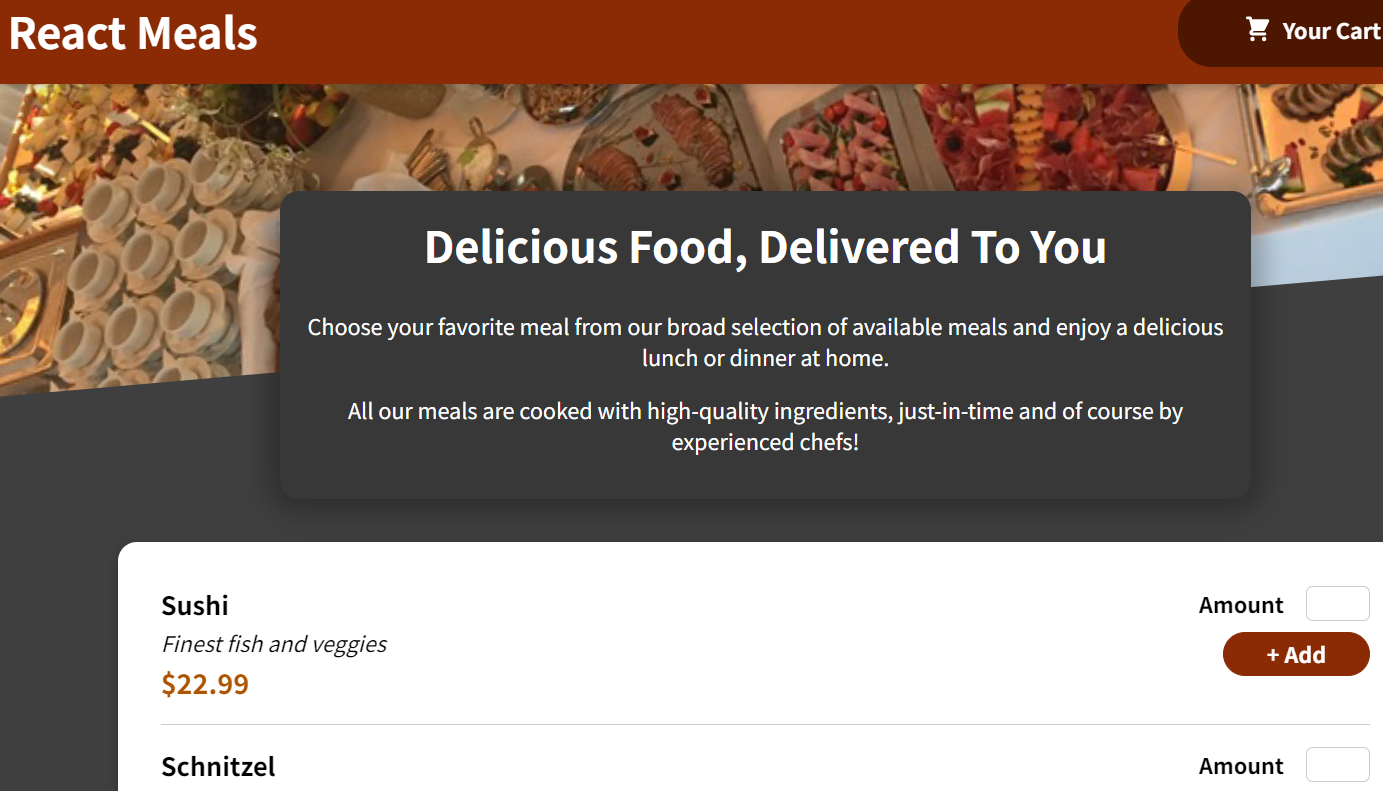
React Food Order App
Modern Food Ordering Platform
A modern and responsive food ordering application built with React, featuring cart management, meal customization, and seamless user experience with contemporary UI design.
Key Features
Cart Management
Intuitive cart system allowing users to add, remove, and modify meal quantities with real-time total calculation.
Meal Catalog
Comprehensive meal catalog with detailed descriptions, pricing, and appealing food imagery.
Responsive Design
Fully responsive design optimized for desktop, tablet, and mobile devices with touch-friendly interactions.
User Experience
Smooth and intuitive user interface with seamless navigation and instant feedback for all interactions.
Development Journey
Project Setup & Planning
Set up React development environment, planned component structure, and designed the application architecture with state management strategy.
Component Development
Built core components including meal cards, header, cart modal, and navigation. Implemented reusable UI components with proper props handling.
State Management & Cart Logic
Implemented Context API for global state management, built cart functionality with add/remove operations, and quantity management.
Styling & Deployment
Applied responsive CSS styling, optimized for mobile devices, and deployed to Netlify with continuous integration setup.
Challenges & Solutions
State Management
Managing complex state across multiple components while maintaining performance and avoiding prop drilling.
Implemented Context API and Redux Toolkit for centralized state management with optimized re-renders using memo and selectors.
Creating reusable, flexible components that work across different parts of the application.
Developed custom hooks and higher-order components (HOCs) to extract common logic and create truly reusable component patterns.
Implemented Context API and Redux Toolkit for centralized state management with optimized re-renders using memo and selectors.
Implementing efficient form handling with validation and error management.
Used controlled and uncontrolled components with custom validation hooks and React Hook Form for complex form scenarios.
Implemented Context API and Redux Toolkit for centralized state management with optimized re-renders using memo and selectors.
Optimizing application performance for large datasets and frequent updates.
Applied memoization techniques, virtualization for large lists, and implemented proper dependency arrays in useEffect hooks.
Implemented Context API and Redux Toolkit for centralized state management with optimized re-renders using memo and selectors.
import { createContext, useContext, useReducer } from 'react';

export const CartContext = createContext();

export const cartReducer = (state, action) => {
  switch (action.type) {
    case 'ADD_ITEM':
      export const existingItemIndex = state.items.findIndex(
        item => item.id === action.item.id
      );

      if (existingItemIndex > -1) {
        export const updatedItems = [...state.items];
        updatedItems[existingItemIndex] = {
          ...updatedItems[existingItemIndex],
          amount: updatedItems[existingItemIndex].amount + action.item.amount
        };
        return { ...state, items: updatedItems };
      }

      return {
        ...state,
        items: state.items.concat(action.item)
      };

    case 'REMOVE_ITEM':
      return {
        ...state,
        items: state.items.filter(item => item.id !== action.id)
      };

    case 'CLEAR_CART':
      return { ...state, items: [] };

    default:
      return state;
  }
};

export export const CartProvider = ({ children }) => {
  const [cartState, dispatchCartAction] = useReducer(cartReducer, {
    items: []
  });

  export const addItemToCartHandler = (item) => {
    dispatchCartAction({ type: 'ADD_ITEM', item });
  };

  export const removeItemFromCartHandler = (id) => {
    dispatchCartAction({ type: 'REMOVE_ITEM', id });
  };

  export const cartContext = {
    items: cartState.items,
    totalAmount: cartState.items.reduce((total, item) =>
      total + item.price * item.amount, 0
    ),
    addItem: addItemToCartHandler,
    removeItem: removeItemFromCartHandler
  };

  return (
    <CartContext.Provider value={cartContext}>
      {children}
    </CartContext.Provider>
  );
};

export export const useCart = () => {
  export const context = useContext(CartContext);
  if (!context) {
    throw new Error('useCart must be used within CartProvider');
  }
  return context;
};