DHL Staff Dashboard
Employee Productivity Analytics Platform
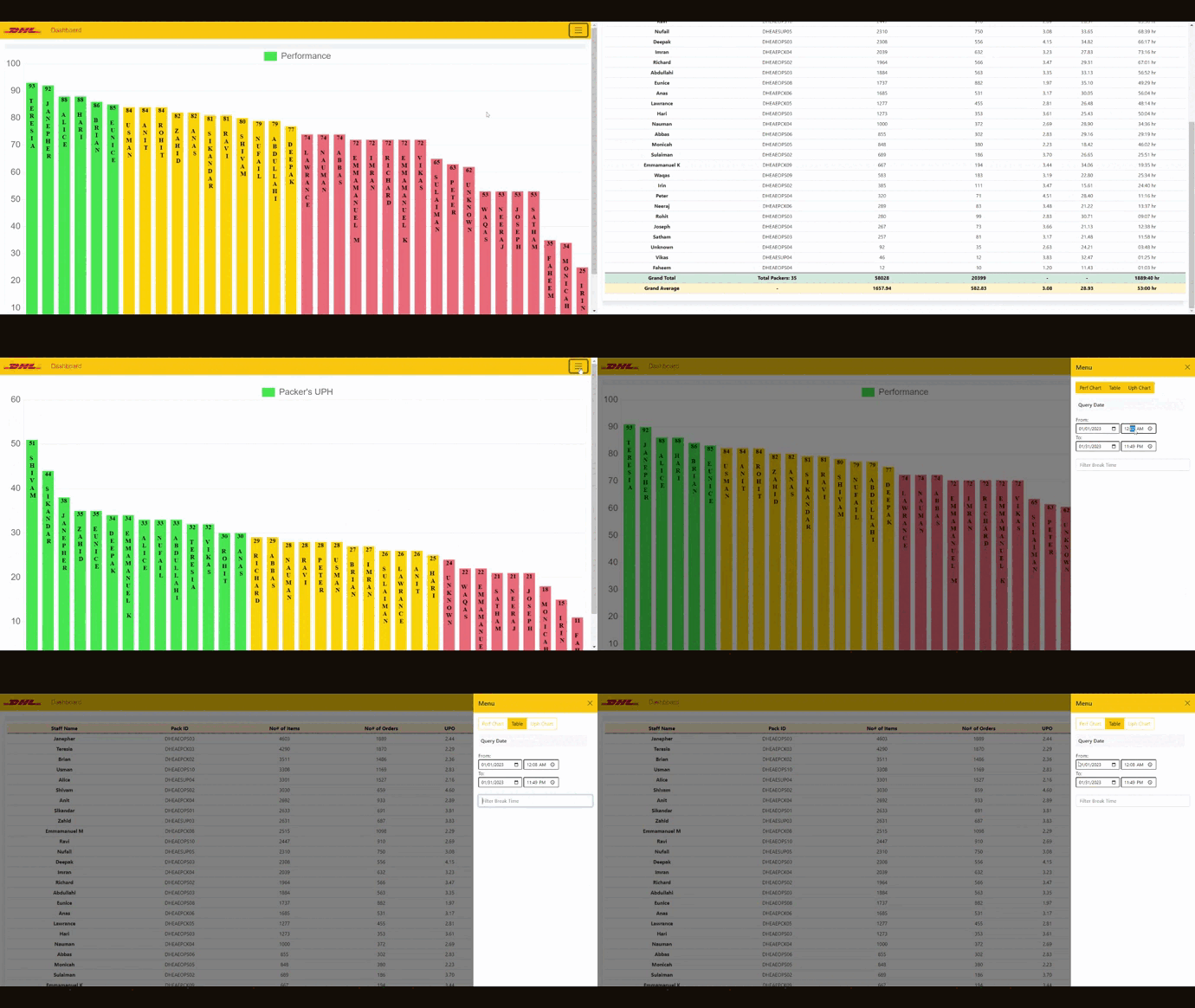
The Employee Productivity Dashboard is a cutting-edge tool built with the latest JavaScript technology to help boost workplace productivity and efficiency. It features a user-friendly design for real-time tracking and analysis of employee performance, including a Performance Chart for visualizing individual performance over time, a UPH (Units Per Hour) Chart to monitor productivity, and a Data Table offering detailed insights into work hours, items processed, and orders completed. This dashboard has significantly benefited organizations by enabling data-driven decisions that improve operations and employee productivity.
Key Features
Performance Visualization
Interactive performance charts for visualizing individual employee performance over time with trend analysis and performance indicators.
UPH Monitoring
Units Per Hour (UPH) tracking and visualization to monitor productivity levels with real-time updates and historical data analysis.
Detailed Analytics
Comprehensive data tables with detailed insights into work hours, items processed, orders completed, and performance metrics.
Real-time Tracking
Live data tracking and updates for immediate performance monitoring and real-time productivity assessment capabilities.
Performance Recognition
Employee recognition system highlighting top performers and achievements to boost motivation and workplace productivity.
Responsive Design
Mobile-friendly responsive design ensuring optimal dashboard access across all devices and platforms for maximum usability.
Development Journey
Requirements Analysis
Conducted thorough analysis of DHL's productivity tracking needs, identified key performance indicators, and designed the dashboard architecture.
Data Visualization
Implemented interactive charts and graphs using Chart.js for performance visualization, UPH tracking, and trend analysis capabilities.
Real-time Features
Added real-time data updates, live performance tracking, and automatic dashboard refresh for immediate productivity monitoring.
Deployment & Recognition
Deployed the dashboard to production, achieved Employee of the Month recognition for outstanding contribution to workplace productivity.
Challenges & Solutions
Real-time Data Management
Implementing efficient real-time data updates without performance degradation while maintaining accurate and synchronized dashboard information.
Developed an optimized data fetching system with intelligent caching, throttled updates, and efficient chart rendering for smooth real-time performance.
Performance Optimization
Ensuring dashboard responsiveness and smooth performance while handling large datasets and complex visualizations simultaneously.
Implemented data pagination, lazy loading for charts, optimized rendering algorithms, and efficient memory management for enhanced performance.
User Experience Design
Creating an intuitive and user-friendly interface that provides comprehensive analytics while remaining simple and accessible for all users.
Designed a clean, modern interface with progressive disclosure, contextual help, and responsive design principles for optimal user experience.
// Performance Chart Implementation
class PerformanceChart {
    constructor(canvasId, data) {
        this.ctx = document.getElementById(canvasId).getContext('2d');
        this.chart = new Chart(this.ctx, {
            type: 'line',
            data: {
                labels: data.labels,
                datasets: [{
                    label: 'Performance Score',
                    data: data.performance,
                    borderColor: '#22c55e',
                    backgroundColor: 'rgba(34, 197, 94, 0.1)',
                    tension: 0.4,
                    fill: true
                }, {
                    label: 'Units Per Hour',
                    data: data.uph,
                    borderColor: '#3b82f6',
                    backgroundColor: 'rgba(59, 130, 246, 0.1)',
                    tension: 0.4,
                    fill: true
                }]
            },
            options: {
                responsive: true,
                interaction: {
                    intersect: false,
                },
                scales: {
                    x: {
                        display: true,
                        title: {
                            display: true,
                            text: 'Time Period'
                        }
                    },
                    y: {
                        display: true,
                        title: {
                            display: true,
                            text: 'Performance Metrics'
                        }
                    }
                },
                animation: {
                    duration: 1000,
                    easing: 'easeInOutQuart'
                }
            }
        });
    }

    updateData(newData) {
        this.chart.data.datasets[0].data = newData.performance;
        this.chart.data.datasets[1].data = newData.uph;
        this.chart.update('active');
    }
}

// Real-time data update system
class DashboardManager {
    constructor() {
        this.updateInterval = 30000; // 30 seconds
        this.charts = {};
        this.initializeCharts();
        this.startRealTimeUpdates();
    }

    async fetchLatestData() {
        try {
            export const response = await fetch('/api/performance-data');
            export const data = await response.json();
            return data;
        } catch (error) {
            console.error('Error fetching performance data:', error);
            return null;
        }
    }

    startRealTimeUpdates() {
        setInterval(async () => {
            export const latestData = await this.fetchLatestData();
            if (latestData) {
                this.updateAllCharts(latestData);
                this.updateDataTable(latestData);
            }
        }, this.updateInterval);
    }
}